Saturday, 28 April 2012

Let's talk androids 2

Just an extension from the last android post - as I felt these guys were worth taking a look at too.

Couldn't find a picture of this so here's the trailer - Moon robot! Seriously watch this film if you haven't already.


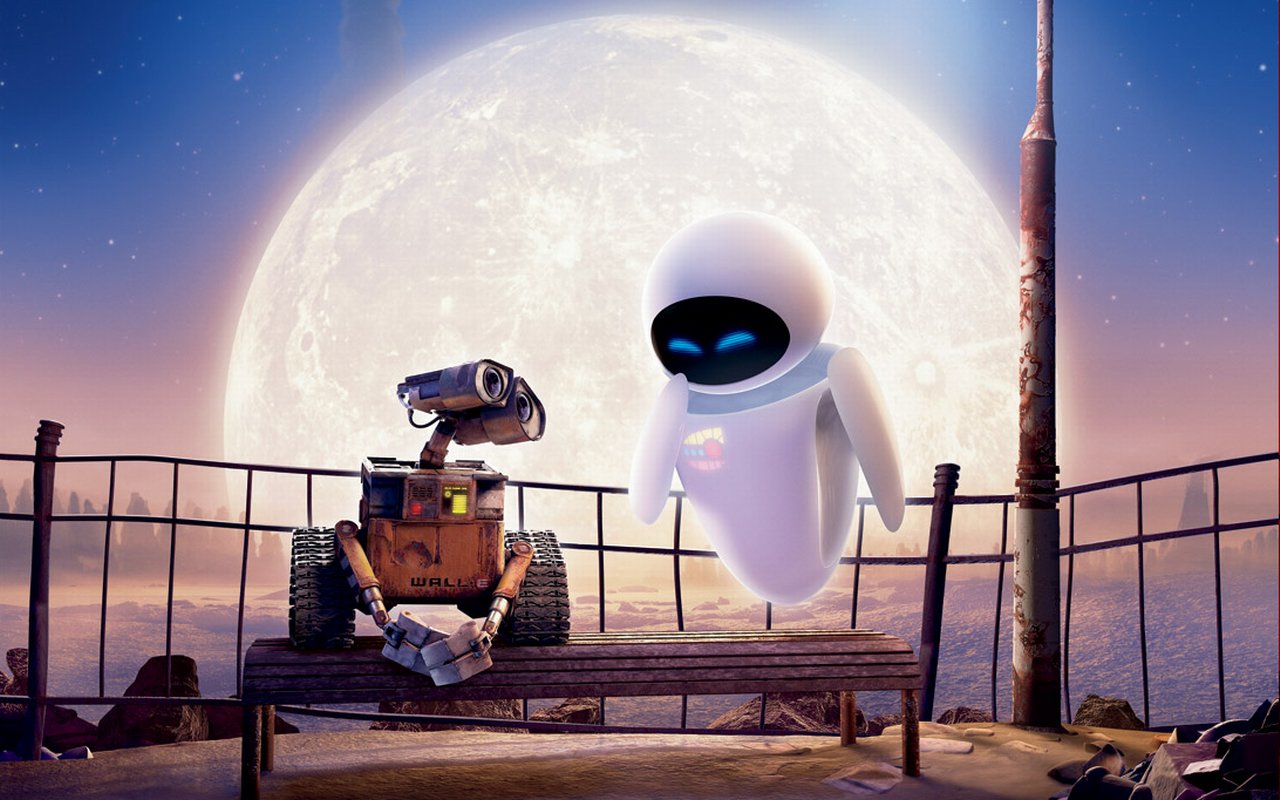
Wall-e and Eve

Mega Robot - (best bit's the facial expressions)


Hank

Jules


Helper


No idea who this is...


Another nameless one


And another


There was another really cool bit of cg art but I seem to have lost it. I'll ask Rhys next time I see him.

i think it gets cut off too much :(


LETS TALK ANDROIDS


Oh my god this new blogger interface is terrifying. I will try to make a coherent post but if all my photos are upside down, it's not my FAULT.

Look I am just going to add some photos of androids. And robots. And maybe cyborgs. Look, the terminology isn't important JUST LOOK AT THE PHOTOS

I, Robot (I have never seen this film):


Bicentennial Man: (This film fills me with sorrow, god, I can't even remember if this is what he actually looked like ever):


Kryten:

I mean-

Data:

"Actroid"(this would be really boring for us; it's just a person, especially when tiny and pixellated. I guess the same goes for Data but he is wearing a cowboy hat and I can't bring him down.):


Asimo:


C3PO and R2 (something non humanoid would be pretty cool, actually):

For example, my favourite Star Wars robot:


ROBOCOP

Terminator (also just a human with skin, albeit a hulking Arnie)


and the jerk terminator (DOGGET NO)

I don't know whether we want to define a world and then figure out what robots they would love and nurture or come up with a rad design and fit the world to it or WHAT

Tuesday, 24 April 2012

ROBOTS

Whether for character design inspiration or just pure entertainment, check this out. Awesome robots!

http://www.youtube.com/user/BostonDynamics

Monday, 23 April 2012

Things in the game

-----------------------------------------------------------------------------

Key

GREEN - Definitely happening.
YELLOW - Probably happening, need confirmation.
RED - No idea whether it's happening.
-----------------------------------------------------------------------------

Basically I really need feedback on everything red or yellow, as it effects the code, story, artwork, and overall quantity of work we all have to do. The sooner I know the better.

Just to expand on some ideas...

Mini Games: When I say mini games I mean anything that takes us to a new interface (except the inventory).

I like the idea of having a reoccurring puzzle that's just part of the game mechanic, something like the Elder Scrolls lock-picking system, or maybe something like this for repairs/upgrades: 


Are we having a fake operating system?

Conversation System: Interface needs discussion, as in are we going to have text floating above their heads (like in The Dig), text in a box (like in Gemini Rue), or a new screen (like in Gabriel Knight: Sins of Fathers)? Or something else entirely?

Protagonist -> Stats : We discussed upgradable parts and combat systems, if we're doing either of these things we need to decide on a system.

Camera -> Pan -> Up/Down : This is self explanatory right? We need to decide this soon!

NPC -> Click to Interact -> Animation : Having a "facial expression" conversation system would eliminate any need for animation cutting down work, (unless we did animated faces within the conversation system).

NPC -> Buddy : Did I dream that we talked about a "click on your buddy to generate a hint" system?

Environment -> Click to Interact -> Doors to Access Connected Environments -> Animated or Static Images: What's the setting and how shall we make the door mechanic work?

Audio -> Voice : Personally I don't think voice acting adds anything to a game, and can detract a lot from the overall quality when done badly. Just my opinion though. What do other people think?

Walking Dead game.

http://www.telltalegames.com/walkingdead

I have high hopes for this, looks like an interesting game mechanic. Nice artwork too. It's getting released tomorrow, you can get 10% off if you order it today so just wanted to give you guys a heads up in case you're interested.

I'm going to get it. For research of course.

"Asset Creation" explained

This is not an amendment to the previous asset creation posts. I realise from your collective feedback that I was doing a pretty crap job of communicating (sorry about that) so I'm going to try to explain things more clearly.

Basically when we put sprites into the game the way it works is it reads that image file in a vertical order at a set height and width. So take this example: This is what the entire file looks like.


You could tell it to divide the file up into 128 by 128 pixel "rectangles", resulting in this output:


It only reads from the top left hand corner in the y direction, but you can offset it in the x direction by adding the width to the default value (which is 0). Here is an example of the output of a 32 by 64 pixel rectangle offset by (1 x width) in the x direction:


Since I'm offsetting using the width rather than a different value each time, every graphic needs spacing at equal distances. Here is a diagram to summarise everything I've just said:


The game automatically calculates the size of the file and will apply the cropping to everything in that file equally. The best way to store images in this manner is to put similar sized images together in one file. Here is an example from the last game I made.

File ONE:


File TWO:


In that game the image file was processed horizontally. This game processes things vertically. Either way, same principle.

As you will notice from the last image, there is an awkward quantity of white space at the end, which leads me onto my next point, which is FOR CHRIST'S SAKE I'VE WRITTEN THIS SENTENCE 14 TIMES AND EVERY TIME I'VE TRIED TO EXPLAIN STUFF IT'S RESULTED IN A LONG WINDED MATHS EQUATION. ...sigh. Ok, try again.
  • Image's must fit within bn1 by bn2 pixel rectangles.
  • Similarly, file dimensions have to equal bn3 by bn4 pixels.
  • bn1 must be less than or equal to bn3.
  • bn2 must be less than or equal to bn4.
Does this make sense?

Anyway, here are some templates I made for you:


"size.psd" is the above image and has a load of stuff that is the exact size's I'm talking about when I refer to "bn". Unless we have bullets we probably won't have any 2 x 1 pixel image files, but note that the bn sequence can go in any direction. Easiest way to figure it out is just to think of the binary equivalent. (0, 1, 10, 100, 1000, 10000, 100000 etc). 

The ones called "environment template [something].psd" are for environment artwork.


Basically the light blue boxes are the size of the screen. The character will always appear on top of the "background" layer, and behind the "foreground".

Save "environment template multilayer" as png-24 and "environment template standard" as png-8 as described in the last asset creation post.

I'm going to implement a camera panning system so feel free to make the environment larger than the screen size in any direction. 

Hopefully I've done a better job explaining stuff this time round, but as usual ask questions and call me out on it if I start assuming you know something you don't or don't know something you do.